- Runs entirely on your Mac
- Free
- No account
Remembers everything.
Tells no one.
Binders is a free Mac app that turns what you say, what you hear in meetings and what you write into notes, to-dos and a memory you can ask anything. The speech models, the AI and your data all stay on your Mac.
Free, with no account and no subscription · macOS 14.2 or later · Notarized by Apple
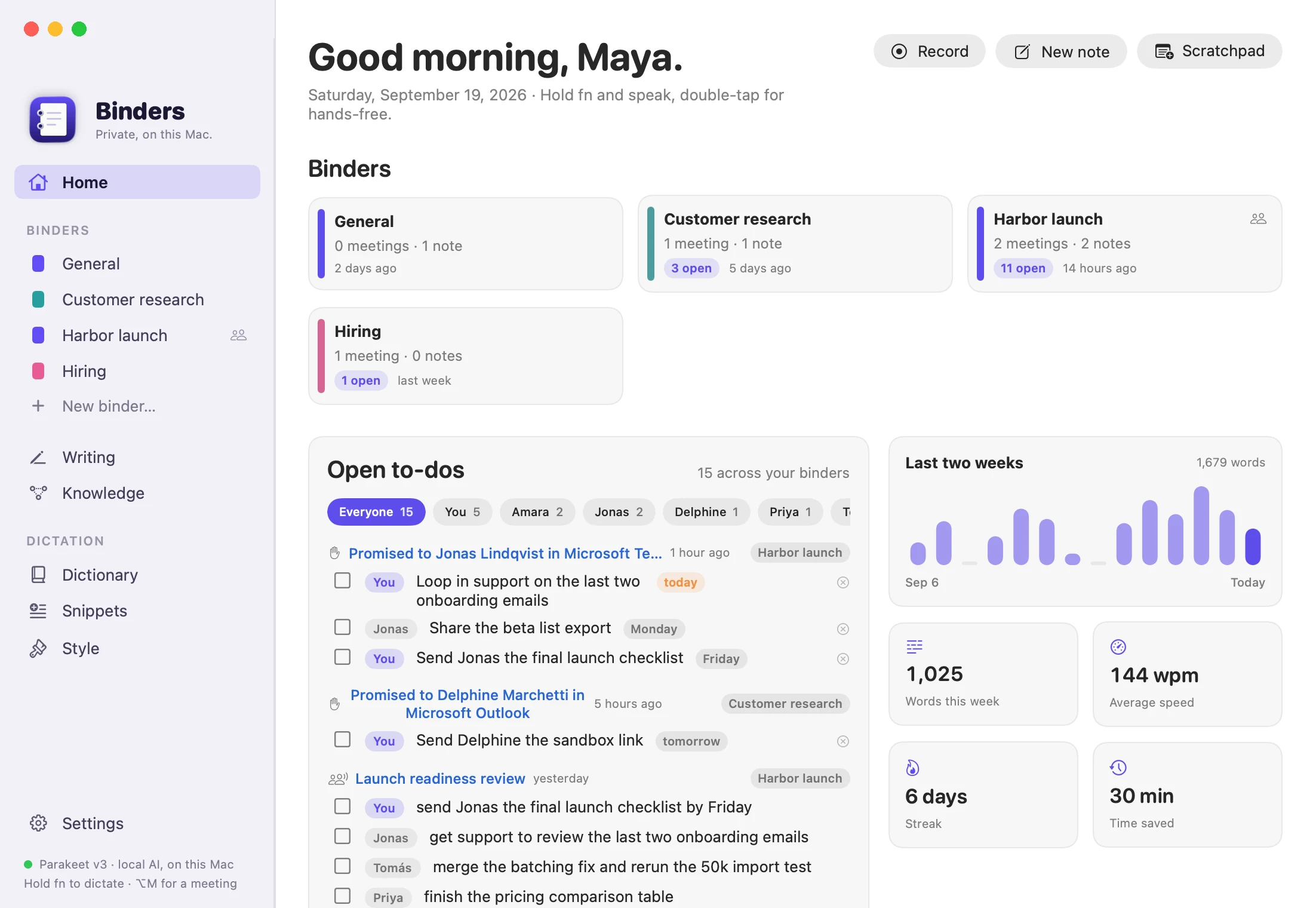
Private by construction, not by policy.
Your voice stays here
Speech is transcribed on the Neural Engine of your Mac. Audio is never uploaded, and once the speech model has downloaded, dictation works offline.
Your AI, on your machine
Notes, answers and to-dos come from a language model running in Ollama on your Mac. With that default, no prompt ever leaves it.
Free, because there is no server
No account, no analytics, no cloud of ours. Nothing runs on our side, so there is nothing to charge you for.
Ask
Ask your work anything.
Every meeting, note and message you keep becomes something you can question in plain language. Type it on the Knowledge page, or hold fn ⌃ and ask out loud. Answers come with the sources they were drawn from.
- Finds things by meaning, not just matching words.
- Reads transcripts too, so “what did I say in that meeting” works.
- Answered by the model on your Mac. Your questions stay private as well.
Answer
You promised Jonas the following this week:
- The final launch checklist by Friday [1][2][3].
- To loop in support on the last two onboarding emails today [1].
Sources
- To Jonas LindqvistSep 19 · Microsoft Teams
- Launch readiness reviewSep 18 · transcript at 00:04
- Launch readiness reviewSep 18 · Summary
These are real answers. Binders produced them from the fictional demo data in these screenshots, using a model running on a Mac.
Say it. Dictation in any app.
Hear it. Meeting notes with owners.
Write it. Promises become to-dos.
Find it. A memory with connections.
Dictation
Hold fn. Talk. Let go.
Your words land in whatever app has the cursor, already cleaned up: no ums, no false starts, and the correction you made mid-sentence is the one that sticks. Speech recognition runs on the Neural Engine, so it is fast and it works offline.
- Learns names and jargon from the edits you make afterwards.
- Command mode rewrites the selected text: “make this shorter”.
- Matches the tone of the app: looser in chat, tidier in mail.
What you said
so I think we should meet at 2 actually no 3 pm tomorrow and bring the slides
What lands in the app
I think we should meet at 3 pm tomorrow and bring the slides.
- fn hold
- Dictate
- fn fn
- Hands-free
- fn ⌃
- Command mode
- ⌥ M
- Meeting notes
- fn W
- Writing capture
Meetings
Notes that know who owes what.
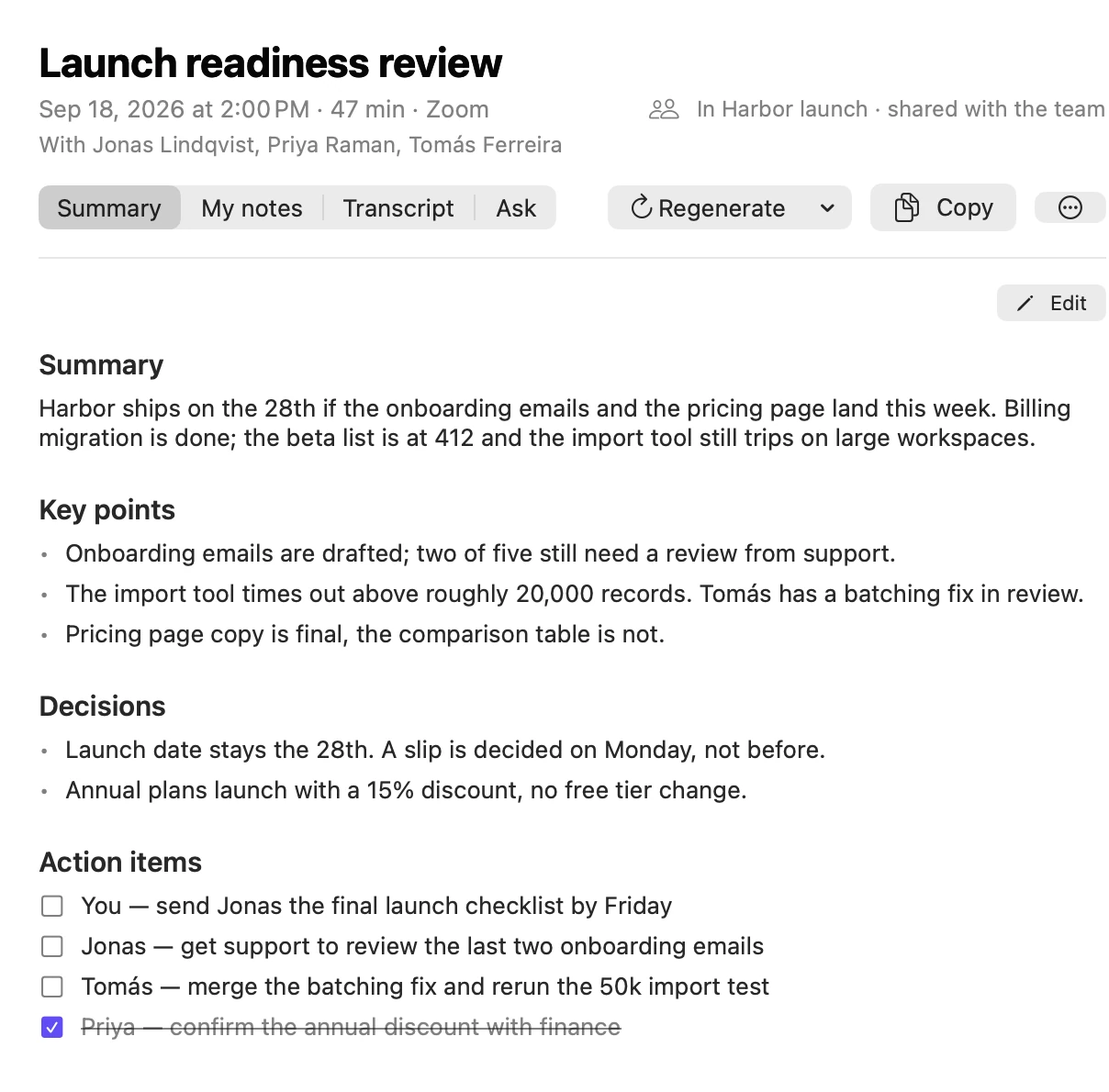
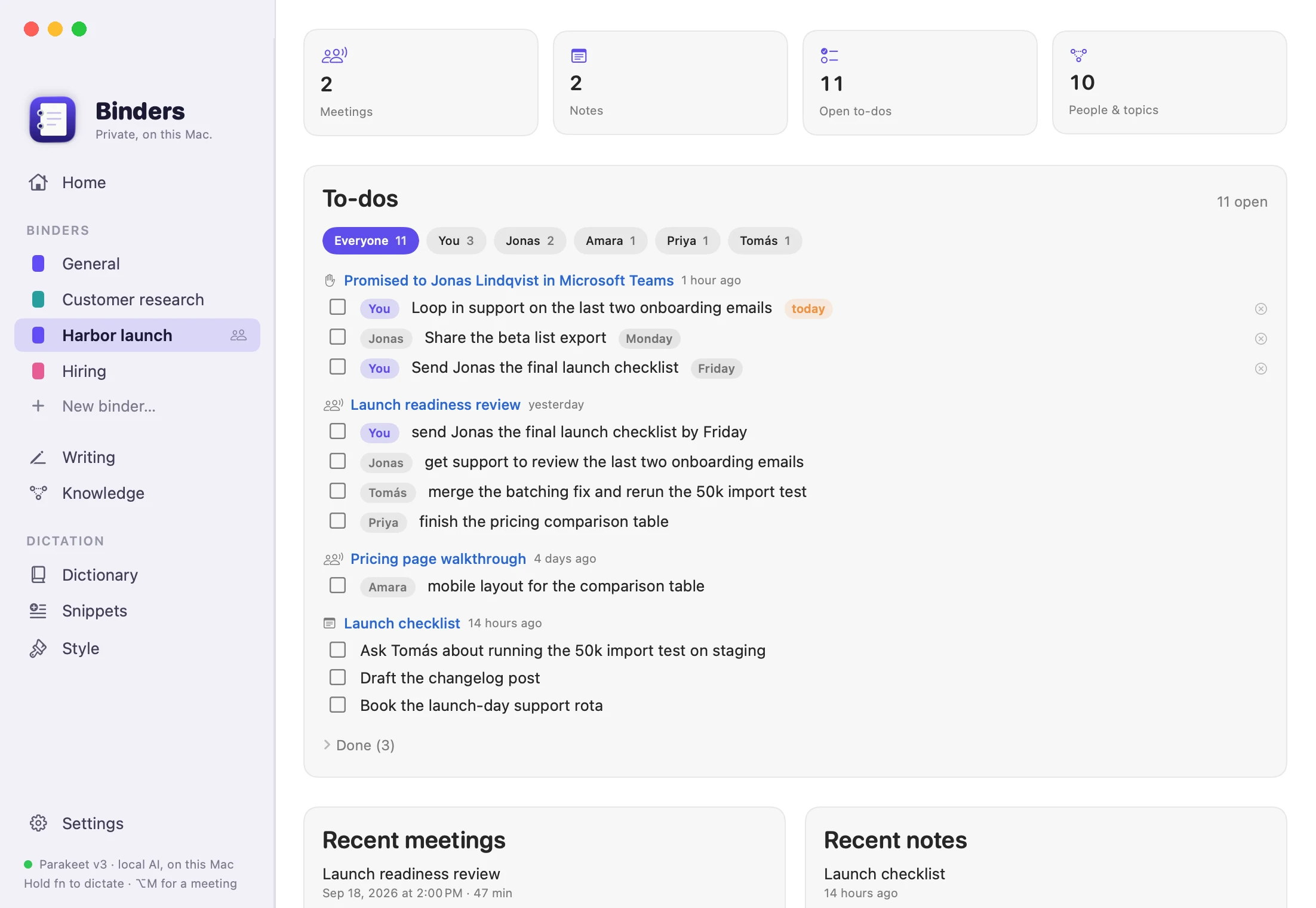
Binders records your microphone and the other side of the call in any meeting app, then writes the summary, the decisions and the action items, each with its owner. Every to-do from every meeting collects on one board, filtered by person.
- Works with Zoom, Teams, Meet or a recording you import.
- Full transcript with speakers, and an Ask tab for follow-up questions.
- Edit the notes and tick to-dos off right where they live.
Writing capture
It catches the promises you make.
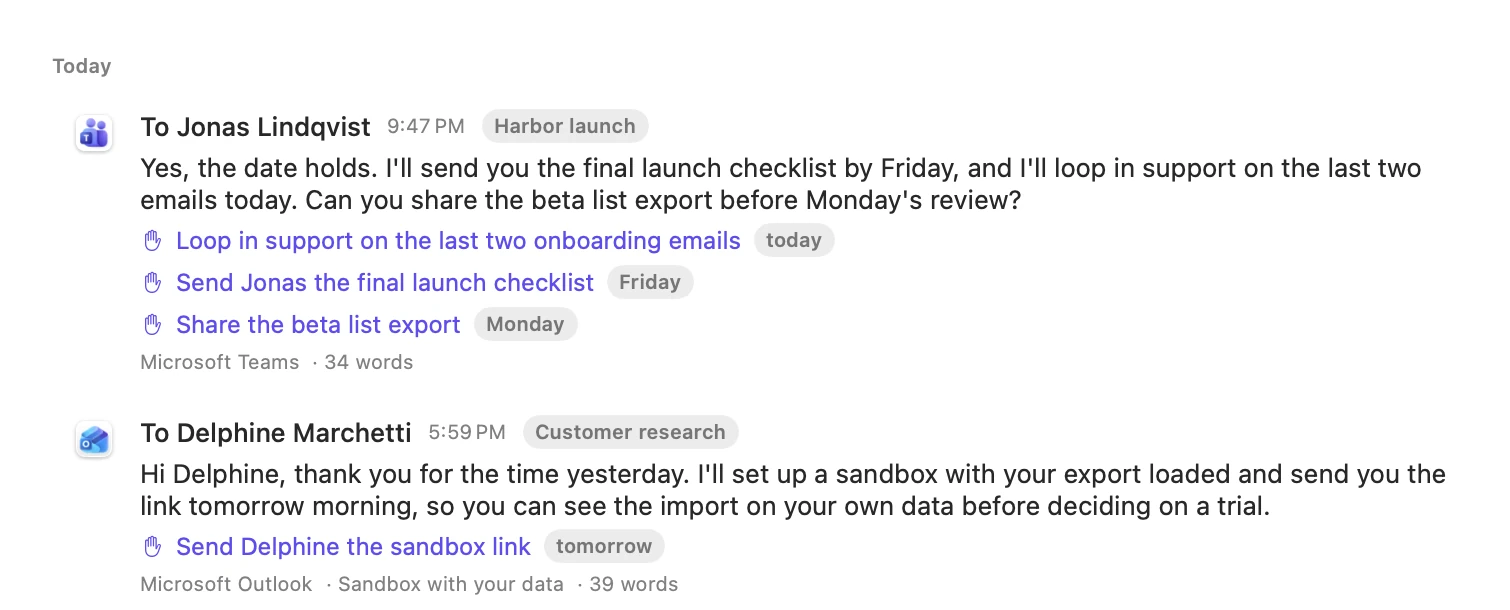
Switch capture on and Binders keeps what you send in Teams, Outlook, Mail, Slack and your browser. When a message says “I’ll send it by Friday”, that becomes a to-do with a deadline and a reminder on the morning it is due.
- Kept only when you send or save. Keystrokes are never recorded.
- Labelled passwords, card numbers and long keys are redacted before anything is stored.
- Password managers and terminals are never read, and pages that look like a login or a payment are skipped.
Knowledge
A memory with connections.
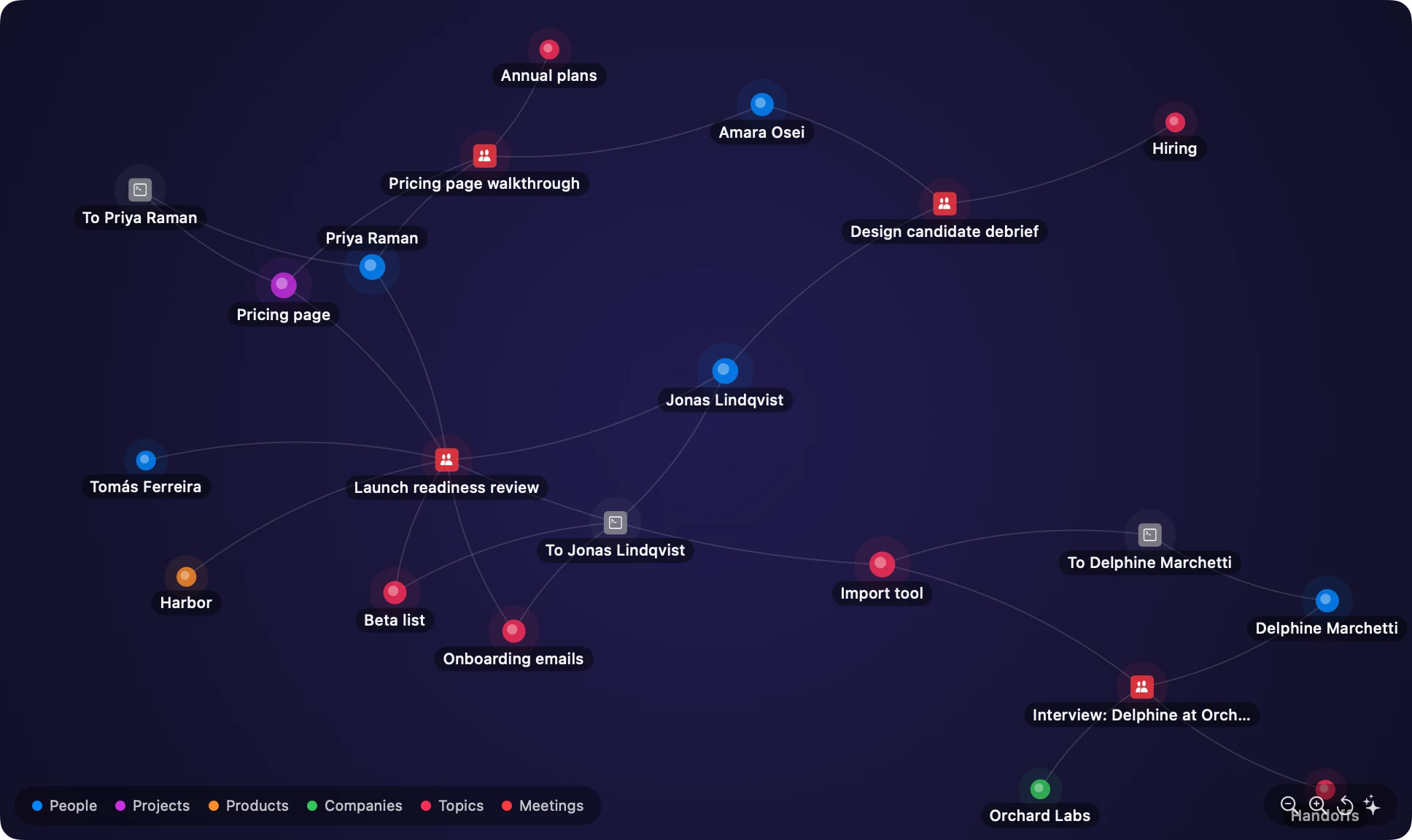
Meetings, notes and messages are indexed together, and the people, projects and topics in them are linked into a graph. Search by meaning, or hold the command shortcut and ask out loud: “what did we decide about annual plans?”
- Answers cite the meeting or note they came from.
- Merge, rename or forget a person when the graph gets it wrong.
Binders and teams
One binder per thing you are working on.
A launch, a hire, a customer. Each binder holds its meetings, notes, to-dos and the people who come up in it. Share a binder with your team through a folder you already sync, such as OneDrive, Dropbox, Google Drive or iCloud Drive. There is no server of ours in between.
Privacy
Yours, on your Mac.
Binders has no account, no analytics and no cloud of its own. Here is exactly where your data goes.
Stays on this Mac
- Audio, transcripts, notes, meetings and captured writing, in one folder you can open.
- Speech recognition, with Parakeet or Whisper running on the Neural Engine.
- The search index and the knowledge graph.
- Your dictionary, snippets and settings.
Leaves only where you point it
- Text sent to your language model: Ollama on your Mac by default, or a server you choose.
- Binders you share with your team, through your own cloud folder.
- A one-time download of the speech models.
Binders is free.
No account, no subscription, no trial clock. Everything runs on your Mac, so there is no server for anyone to pay for. Signed and notarized by Apple, so it opens like any other Mac app.
Download Binders 0.1.0, free- 1Open the disk image and drag Binders to Applications.
- 2Allow Microphone and Accessibility when Binders asks. Accessibility is how it sees your shortcut and types for you.
- 3For AI formatting, notes and to-dos, Binders uses Ollama, the free software that runs the language model on your Mac. If you don’t have it, Binders can install it for you, then download a model that fits your Mac’s memory, from 8 GB up. Dictation works without any of this.
Version 0.1.0, a preview. Requires macOS 14.2 or later. Apple silicon recommended. Updates arrive inside the app, signed, and only once you allow it to check.
SHA-256 f76a97c2b430a4138b49bc4ada05d45d323bd07ab2709f69d139791755ac65ca